A practical architecture for managing personal AI agents, automations, copilots, and plugins with permissions, logging, review, and kill switches.
There is a moment that happens quietly.
It does not arrive as a breach notification. It does not show up as a red team finding. It is not accompanied by the dramatic music we have been trained to expect when technology gets ahead of us.
It happens on a Tuesday afternoon, when you are moving fast between client calls and realize that five different AI-enabled tools now have some level of access to your email, calendar, files, notes, browser history, task list, CRM, code, or client context.
One tool summarizes meetings. Another drafts follow-up messages. A third reads your documents and answers questions. A fourth watches your calendar and tries to protect focus time. A fifth is connected through a plugin to some SaaS platform you barely remember authorizing.
None of this felt reckless at the time.
Each grant of access was individually reasonable. Summarize this inbox. Search this folder. Read this transcript. Draft this response. Monitor this channel. Pull this file. Schedule this thing. Remember this preference.
The problem is not that any one of these tools is obviously dangerous. The problem is that, taken together, they start to form an invisible layer of authority over your work.
Not just assistance.
Authority.
That is the part we need to take seriously.
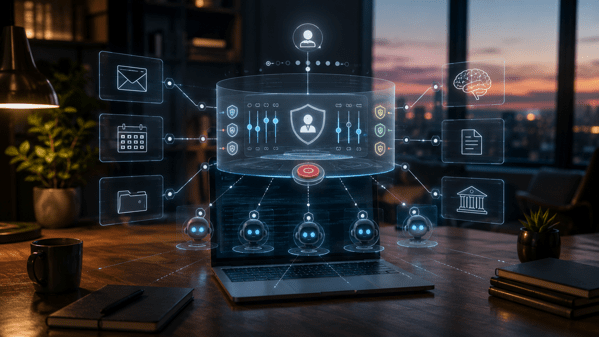
Agentic Convenience Creates Unmanaged Authority
Most of us are still thinking about personal AI in terms of features.
We ask what a tool can do.
Can it summarize email? Can it prepare research? Can it join meetings? Can it update the CRM? Can it create tasks? Can it generate code? Can it move information from one system to another?
Those are useful questions, but they are incomplete.
The better question is:
What authority did I just delegate?
Authority is broader than access. Access means the system can see or touch something. Authority means it can act in a way that changes your environment, your commitments, your reputation, your records, or your security posture.
A read-only research assistant that can search public websites has limited authority. A meeting assistant that can join confidential calls, record the audio, extract action items, email clients, and update your project tracker has quite a bit more. A finance assistant that can read invoices, classify expenses, and initiate payments is no longer merely “helpful.” It is operating near the boundary of control.
This is the inversion I think many people miss.
We imagine we are using AI tools. In practice, we are often creating a mesh of delegated decision points that use us as the approval boundary only when the workflow designer remembered to include one.
That is not a reason to avoid AI agents or automation. I am not interested in going back to manually copying data between systems like it is some sort of moral virtue.
The goal is not to resist automation.
The goal is to put a control plane above it.
In infrastructure, this idea is obvious. We do not just spin up services and hope everyone remembers what connects to what. We define identities. We assign permissions. We log activity. We review access. We revoke credentials. We segment environments. We monitor blast radius. We try, however imperfectly, to separate the thing doing the work from the system governing the work.
Personal AI needs the same pattern.
Not because every individual needs enterprise-grade bureaucracy in their personal workflow. That would be absurd. The personal version has to be lightweight, fast, and humane.
But lightweight does not mean nonexistent.
Right now, many power users have built the equivalent of a shadow enterprise around themselves. They have agents, copilots, plugins, browser extensions, API tokens, automation platforms, note-taking systems, RAG pipelines, and SaaS integrations all orbiting their daily work.
Some of those systems contain sensitive data.
Some can act.
Some can remember.
Some can call other tools.
Some can silently persist permissions long after the user has forgotten why they were granted.
That is the automation tax showing up in a new form. The first cost was setup. The second cost was maintenance. The third cost is governance.
Ignore that third cost and your workflow becomes a permission swamp.
The Five-Layer Personal AI Control Plane
A control plane is the governance layer that sits above execution.
The agents, automations, copilots, and plugins are the data plane. They do the work.
The control plane decides who they are, what they can touch, what they remember, what gets logged, and how they get shut off.
For personal AI, I think the control plane needs five layers:
- Identity
- Permissions
- Memory
- Audit
- Revocation
This does not need to be fancy.
A spreadsheet can be a control plane if you actually use it. A note in your knowledge system can be a control plane if it is complete and reviewed. A small database or dashboard can be a control plane if you want to go further.
The architecture matters more than the tooling.
1. Identity: Know What Is Acting for You
The first layer is identity.
Every agent, automation, copilot, integration, and plugin should have a name and a purpose.
That sounds obvious until you look at your own environment.
You may have authorized a browser extension six months ago. You may have connected a meeting recorder to your calendar. You may have granted a note-taking tool access to cloud storage. You may have allowed a chatbot to connect to your email. You may have generated an API token for a weekend experiment that somehow still exists.
If you cannot name it, you cannot govern it.
Identity is not just the vendor name. “Chat tool connected to Google Workspace” is not enough. The identity should describe the role it plays in your workflow.
Examples:
- Email triage assistant
- Client meeting summarizer
- Research collector
- Personal finance classifier
- Blog drafting copilot
- Code review assistant
- Calendar protection automation
Roles force clarity. They also make drift visible.
If the “research collector” now has the ability to send email, something has changed. Maybe that is justified. Maybe it is not.
Either way, the identity gives you something to compare against.
2. Permissions: Least Privilege for the Solo Operator
The second layer is permissions.
Least privilege is easy to endorse and hard to live. The reason is simple: friction.
Broad access makes tools more useful immediately. Narrow access requires thought. Most consumer and prosumer AI tools optimize for activation, not restraint. The happy path is “connect your account,” not “select the minimum viable scope for this agent’s job.”
So we need to impose the discipline ourselves.
For each AI-enabled tool, ask four questions:
- What can it read?
- What can it write?
- What can it trigger?
- What can it share?
Read access is not harmless. A tool that can read your notes, email, documents, and transcripts can assemble a fairly rich map of your life and work.
Write access is more serious because it can change systems of record.
Trigger access matters because it can initiate workflows, send messages, schedule events, create tickets, or call other automations.
Share access is often the most overlooked because it determines whether information can leave the boundary you assumed it stayed inside.
The personal version of least privilege is not about perfection. It is about reducing avoidable scope.
A research agent probably does not need email send permissions. A meeting summarizer probably does not need full access to every file in cloud storage. A drafting assistant may need access to selected notes, but not your entire archive. A finance assistant may need to classify transactions, but not initiate payments without explicit review.
When in doubt, split roles.
One agent collects. Another drafts. A human approves. A separate automation files the output.
That sounds inefficient, but separation of duties is often cheaper than cleaning up a bad autonomous action.
3. Memory: Decide What Gets Remembered
Memory is where personal AI gets both powerful and creepy.
Persistent memory allows systems to learn preferences, maintain context, and reduce repetitive prompting. It is also a place where sensitive information accumulates outside your normal mental model of storage.
People tend to think of memory as convenience.
Security people should think of it as a data store.
What does the agent remember? Where is that memory stored? Can you inspect it? Can you delete it? Does it include client names, project details, health information, financial information, credentials, personal relationships, or internal strategy? Does the memory cross contexts that should remain separate?
One of the most useful patterns here is memory segmentation.
Do not let every agent remember everything. Your personal writing assistant does not need the same memory as your client research assistant. Your finance assistant does not need the same memory as your travel planner. Your code assistant does not need your family logistics.
Context collapse is convenient until it becomes a confidentiality problem.
Graph-first RAG makes this even more important. Once your notes, documents, people, projects, and decisions are connected into a retrieval layer, access to that layer becomes access to a map of relationships.
That map is often more sensitive than the individual documents.
A single note may be mundane. The graph that connects clients, concerns, projects, timelines, and decisions may be extremely revealing.
Memory needs labels.
At minimum, decide whether an agent’s memory is:
- Ephemeral: used for the session and then discarded
- Local: stored in a system you control
- Vendor-held: stored by the tool provider
- Shared: available to other agents, plugins, or workflows
You do not need a legal department to make better choices here.
You just need to stop treating memory as magic.
4. Audit: Make the Invisible Visible
The fourth layer is audit.
Automation becomes risky when actions disappear into the background. A human may be slow and inconsistent, but at least they usually remember doing the thing.
Agents do not have that same accountability trail unless we create it.
At a personal level, audit should answer a handful of practical questions:
- What did the agent access?
- What did it produce?
- What did it change?
- What did it send?
- What did it decide without review?
- What failed?
The audit layer can be simple.
Keep a log of agent actions. Use labels in your email for AI-generated drafts. Route important agent outputs through a review folder. Maintain a weekly changelog for automations. Store summaries of agent activity in a note called “AI Activity Review.”
The point is not to create theater.
The point is to create reconstructability.
When something goes wrong, you should not be forced to rely on vibes. You should be able to determine which system acted, what authority it had, what data it used, and what it changed.
That is incident response scaled down to the individual.
Audit also supports trust calibration. If an agent keeps making small mistakes, you will see the pattern. If it starts touching data outside its intended role, you will catch the drift. If it is quietly saving you hours without creating risk, the log will show that too.
5. Revocation: Every Agent Needs a Kill Switch
The final layer is revocation.
This is the one most people skip because it feels negative.
We like turning things on. We are less disciplined about turning things off.
Every personal AI tool should have a clear shutdown path.
Where do you revoke OAuth access? Where are API tokens stored? Which browser extensions have account access? Which automations will fail if you disconnect a tool? Which memories need to be deleted? Which scheduled tasks need to be disabled? Which webhooks are still active?
A kill switch is not just an emergency measure. It is also a maintenance tool.
If a project ends, revoke the agent’s access. If a client engagement closes, remove the tool from that context. If a plugin was installed for a test, uninstall it after the test. If an automation has not run in ninety days, either justify it or remove it.
Revocation is how you keep yesterday’s experiments from becoming tomorrow’s attack surface.
Build a Personal Agent Registry
The simplest implementation of this control plane is a personal agent registry.
Do not overbuild it. Start with a table. The table can live in a spreadsheet, a note, a project management tool, or a local database.
What matters is that it becomes the source of truth for delegated AI authority.
Here is the minimum useful version:
- Agent or tool name
- Role or purpose
- Owner, which is probably you
- Systems connected
- Read permissions
- Write permissions
- Trigger permissions
- Memory type
- Autonomy level
- Review requirement
- Last reviewed date
- Revocation steps
- Blast Radius Score
That may look like a lot, but most entries take a minute or two once you get into the rhythm.
The first pass is the painful one because it exposes how much you have authorized casually.
That discomfort is useful.
It is your actual environment coming into focus.
Then add an access review cadence.
Monthly is reasonable for heavy AI users. Quarterly is probably enough for lighter usage.
The review should be brutally practical:
- Is this tool still used?
- Does it still need every permission it has?
- Has its role changed?
- Has the vendor changed terms, features, integrations, or defaults?
- Has the data sensitivity changed?
- Are logs available and useful?
- Can I revoke it cleanly?
The registry also gives you a place to record compensating controls.
Maybe a tool needs broad read access, but you only use it in a dedicated workspace. Maybe an assistant can draft email, but sending is disabled. Maybe a meeting tool can summarize calls, but confidential clients are excluded. Maybe a finance assistant can classify expenses, but payments require manual approval.
This is where security becomes design instead of fear.
The Agent Blast Radius Score
Not all agents deserve the same level of concern.
A local writing assistant with no external integrations is not the same as an autonomous email agent connected to your calendar, CRM, and document repository.
To prioritize, use a simple Agent Blast Radius Score.
Blast Radius = Access × Autonomy × Reversibility
This is not meant to be mathematically pure.
It is meant to force better judgment.
Access
Score access from 1 to 5.
| Score | Access Level |
|---|---|
| 1 | Public or non-sensitive data only |
| 2 | Limited personal or work context |
| 3 | Broad notes, documents, or project data |
| 4 | Email, calendar, client data, financial data, or source code |
| 5 | Multiple sensitive systems or privileged accounts |
Autonomy
Score autonomy from 1 to 5.
| Score | Autonomy Level |
|---|---|
| 1 | Read-only, human prompted, no actions |
| 2 | Drafts or recommends only |
| 3 | Can create artifacts with review |
| 4 | Can trigger workflows or make changes with limited approval |
| 5 | Can act independently across systems |
Reversibility
Score reversibility from 1 to 5, where higher means harder to undo.
| Score | Reversibility Level |
|---|---|
| 1 | Easy to discard or regenerate |
| 2 | Minor cleanup required |
| 3 | Changes records or creates moderate confusion |
| 4 | Affects clients, finances, production systems, or commitments |
| 5 | Difficult or impossible to fully undo |
Multiply the three values.
A score of 8 probably does not need much ceremony. A score of 40 deserves review. A score above 75 should make you pause. At that level, the agent is not just helping. It is operating with meaningful authority inside your life or business.
The score is useful because it prevents vague anxiety.
You can stop saying, “AI agents feel risky,” and start saying, “This meeting assistant is a 4 × 3 × 3, so I need logging and review, but not a full stop.”
Or, “This finance automation is a 4 × 4 × 4, so it needs explicit approvals and a documented revocation path.”
That is the difference between fear and governance.
Four Practical Examples
The Email Agent
An email agent is tempting because inboxes are where time goes to die.
It can summarize threads, identify priority messages, draft replies, extract tasks, and route follow-ups.
It is also dangerous because email is not just communication. It is identity, authorization, negotiation, memory, and evidence. Email contains client context, password resets, legal discussions, invoices, personal correspondence, and internal decisions.
For an email agent, I would strongly prefer draft-only permissions at first.
Let it read selected labels or folders rather than the entire mailbox. Make sending a human action. Log generated drafts. Review what it marks as urgent. Watch for subtle tone problems, missed nuance, and inappropriate context mixing.
Its blast radius climbs quickly if it can send messages, create calendar events, or trigger downstream workflows.
The Research Agent
A research agent is usually lower risk, especially if it works primarily with public sources.
Its job is to collect, summarize, compare, and synthesize.
The risk changes when you connect it to private notes, client files, paid databases, or internal strategy documents. At that point, it is no longer merely researching. It is blending external information with privileged context.
The control pattern here is source separation.
Keep public research separate from private synthesis. Make citations and source trails mandatory. Do not let the agent write into your permanent knowledge base without review. If it uses a RAG layer, be clear about which collections it can query.
The Meeting Agent
Meeting agents feel benign because they mostly summarize things that already happened.
But they sit at an unusually sensitive point in the workflow.
They hear uncertainty, disagreement, strategy, names, commitments, side comments, and sometimes things that were never meant to become durable records.
A bad summary can create false alignment. A leaked transcript can create real harm. An overzealous action-item extractor can turn a tentative discussion into an apparent commitment.
For meeting agents, consent and scope matter.
Decide which meetings they may join. Exclude sensitive calls by default. Store summaries separately from raw transcripts. Require review before sending summaries externally. Treat action items as proposed, not authoritative.
The Finance Assistant
A finance assistant has obvious utility.
It can classify expenses, flag anomalies, prepare reports, remind you about invoices, and help with forecasting.
It also has one of the clearest lines between assistance and authority.
Reading transactions is one thing. Moving money is another. Changing accounting records is another. Sending payment instructions is another.
The safest pattern is tiered autonomy.
Let it read and classify. Let it recommend. Let it prepare drafts. But require explicit human approval before anything is paid, submitted, reconciled, or sent externally.
Keep logs. Review anomalies. Revoke access immediately when the tool is no longer needed.
A 30-Minute Personal AI Access Audit
You do not need to fix everything today.
You do need visibility.
Set a timer for thirty minutes and do this:
- List every AI tool, agent, copilot, plugin, extension, automation platform, and integration you use.
- Mark which ones connect to email, calendar, files, notes, code, finance, client data, or messaging.
- Identify anything with write, send, trigger, or payment-adjacent capability.
- Find the OAuth, API token, extension, or integration page where access can be revoked.
- Delete or disable anything you no longer use.
- Pick the three highest-risk agents and assign each a Blast Radius Score.
- Add a review date to your calendar for next month.
That is enough to start.
The goal is not to become paranoid.
The goal is to become intentional.
AI agents are going to become more capable, more connected, and more deeply embedded in our workflows. The old model, where we treat each tool as a standalone convenience, will not hold.
The more authority we delegate, the more we need a layer that governs delegation itself.
The personal AI control plane is that layer.
It is how you keep assistance from becoming accidental authority. It is how you use automation without letting automation quietly define the terms of your work. It is how you get the benefit of agents without pretending they are harmless simply because they are convenient.
Before your agents govern your workflow, govern your agents.
Support My Work
Support the creation of high-impact content and research. Sponsorship opportunities are available for specific topics, whitepapers, tools, or advisory insights. Learn more or contribute here: Buy Me A Coffee
* AI tools were used as a research assistant for this content, but human moderation and writing are also included. The included images are AI-generated.

