Lately, I’ve been thinking about what AI and robots might mean for us as we get older.
I’m optimistic. I think these technologies could help us remain functional much longer, compensate for gaps in our healthspan, and preserve the ability to live in our own homes. The more interesting possibility is how far that could go. Could they eventually make nursing-home care unnecessary for many of us?
My own use of AI has made this future feel increasingly plausible. Add the growth of data-driven medicine and medical research, continued progress in AI, and the prospect of manufacturing capable robots at scale, and there is a compelling direction of travel.
My working expectation is that we might be less than a decade away from practical, integrated home-care systems.
That deserves some explanation—and some probabilities.
Independence is a collection of things we can do
Living independently involves a lot of small capabilities: preparing food, keeping a home usable, getting dressed, moving around, remembering commitments, managing medications, and recognizing when something needs attention.
It helps to think about those capabilities individually. A person can retain their interests, judgment, relationships, and desire to live at home while needing substantial help with particular tasks.
A robot that handles laundry, brings something within reach, or assists with a difficult movement could close a specific gap. An AI that organizes appointments, follows an established care plan, and helps coordinate support could close another.
Together, those forms of assistance could change how much independent life remains possible.
There are two related gains here. Medical progress might improve our healthspan: the years we spend in good health. Assistive technology could also extend the period in which we can function well with the health we actually have. A limitation can persist while its consequences for everyday life become smaller.
That second possibility is enormously appealing to me. It means progress could arrive task by task, with each useful capability preserving another part of ordinary life.
The home-care system I have in mind
I’m imagining a combination of household help, physical assistance, memory and coordination support, and ongoing care informed by data.
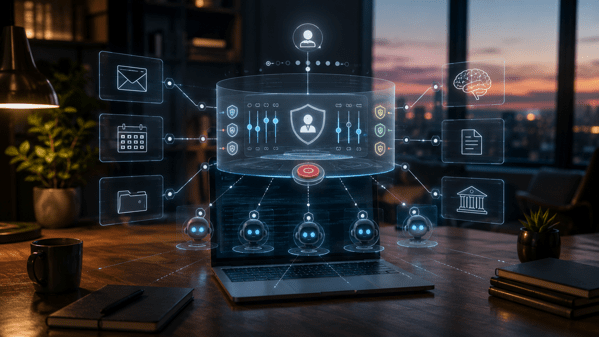
The household layer would take care of recurring work. The physical layer would help us reach, carry, move, and eventually manage more demanding personal-care tasks. The AI layer would keep track of routines and commitments, make complicated interfaces easier to use, and coordinate with the people helping us.
The health-care layer could provide some of the continuity we associate with a home nurse: regular observation, a record of what has changed, follow-through on a care plan, and contact with the appropriate clinician when attention is needed.
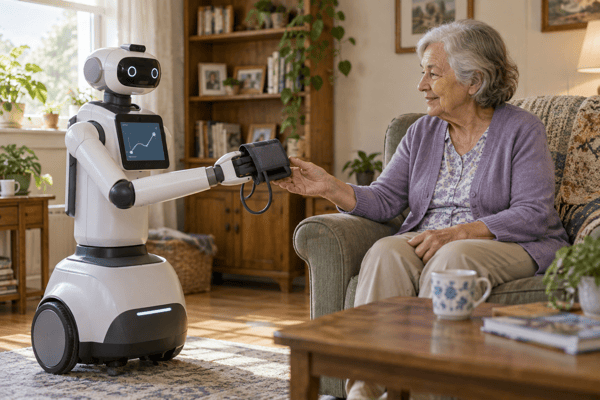
Imagine a system that understands your usual activity pattern, helps you collect relevant measurements, and can put a change in context. It could prepare a useful account for your care team and help arrange the next step. A robot could help you use the measuring equipment or bring it to you.
The clinical decisions and response arrangements would be part of the service. An observation becomes useful when someone can act on it.
Some of this foundation already exists. CMS describes remote monitoring in which connected medical devices transmit measurements to providers for managing a patient’s condition. Its September 2026 ACCESS update describes technology-supported chronic care connected to care teams, with additional condition tracks planned for spring 2027. Those are existing building blocks and an announced expansion, respectively. CMS remote-monitoring guide, ACCESS update
My expectation is that AI will make these pieces easier to combine and personalize. The result could be a home that helps carry the work of staying well and functioning day to day.
We can already see pieces of this future
In September 2026, the University of New Hampshire reported in-home testing of an AI-enabled robot for people with Alzheimer’s disease and dementia. It uses information from cameras, motion detection, and door sensors to deliver prompts for medication, exercise, and other activities. Participants and caregivers reported positive experiences. It remains a research deployment; the update does not establish that it prevents nursing-home admission. UNH’s in-home testing update
Another piece is wearable robotics. A July 2026 feasibility study tested a soft hip exosuit with ten older adults. Participants averaged 1.8 additional sit-to-stand repetitions in a minute, and the metabolic cost of walking fell by 13.6% compared with the unassisted condition. That is a small study of particular tasks, but those tasks matter to everyday mobility. Original exosuit study
The robots that help us age could take several forms: a mobile helper, a wearable device, or equipment built into the home. The useful question is which capability each one gives back to the person using it.
Data-driven home care is also being tested in concrete ways. A 2026 study followed 48 older adults using ambient home sensors, with most monitored for six months. Rules-based alerts escalated to community health workers and nurses; clinical contacts led to 72 interventions. This particular system used rules, with more advanced machine learning identified as future work. It illustrates the value of connecting observation to an actual response. Original smart-home study
These examples make the direction feel tangible. They also show what the next stage needs to establish: dependable operation over time and meaningful improvements in people’s lives.
Elder care gives robotics a reason to scale
I think elder care is a fantastic market for useful robotics. The need is substantial, recurring, and personally important. People want help that preserves their ability to live the way they choose.
The labor-demand picture reinforces that view. The U.S. Bureau of Labor Statistics projects 18% employment growth for home health and personal care aides between 2025 and 2035. That is evidence of growing care demand, rather than a dollar estimate of the market for robots. BLS occupational outlook
Once capable robotics can be manufactured at scale, I expect that demand to give companies a strong reason to improve the products and their economics.
There is still a distance between purchasing hardware and receiving a complete service. Hello Robot currently lists its Stretch 4 platform at $29,950 and offers an assistive pilot program. That price is for a robotics platform; it does not buy the complete home-care system I’m describing. Manufacturer’s current offering
Manufacturing is one part of the economics. Installation, adaptation to the home, repairs, software, support, and access to clinical help all belong in the calculation. I expect leasing and service models to matter because households need dependable assistance over time.
The incentive is unusually clear: deliver enough useful help, at a workable total cost, to let someone continue living at home.
How I would put probabilities around it
My less-than-a-decade expectation points toward the mid-2030s. It helps to separate the milestones that might arrive along the way.
Here is a proposed set of working probabilities, informed by the evidence available in October 2026. These are subjective forecasts for discussion, not probabilities calculated from clinical trials or an expert consensus. The exact numbers are less important than making the expectations explicit enough to revisit.
For the first four milestones, I’m using a deliberately concrete threshold: a supported service operating in at least 10,000 U.S. households, with deployments lasting six months or longer. That would establish an early practical market; it would still be a long way from universal access.
| Milestone reached | By 2030 | By 2035 | By 2045 |
|---|---|---|---|
| AI-supported monitoring, care coordination, and clinician escalation | 85% | 95% | 98% |
| Robots handle several recurring household tasks | 35% | 70% | 90% |
| Integrated AI, household robotics, and health-care coordination at a workable service price | 20% | 60% | 85% |
| Robotic help with transfers, dressing, and toileting for defined care needs | 5% | 25% | 65% |
| Near elimination of long-term nursing-home residence in the U.S. | 1% | 5% | 15% |
The integrated-system row assumes a service price of about $1,500 a month or less in 2026 dollars, including hardware financing, software, maintenance, and technical support. Ordinary housing and separately billed clinical care are additional. That is a working price benchmark, and affordability would still vary considerably by household and coverage.
The hands-on-care row means routine assistance for specified users and homes without a person physically present for every task, with human backup available. It is the more demanding forecast because handling a person safely is harder than handling household objects.
For the final row, “near elimination” means age-adjusted long-term nursing-home use falling to 10% or less of its 2026 level. Short-term skilled rehabilitation is outside that definition.
Each percentage is the chance of reaching that milestone by the end of the named year. The rows can happen together; they do not add to 100%.
The sequence is the main point. Software and connected care have a head start. Physical help needs reliable hardware and support. Bringing everything together at a workable price adds another hurdle. Replacing almost an entire form of long-term care is a much larger claim.
I would move these estimates upward if we see sustained home deployments with few manual rescues, transparent total costs, and controlled studies showing better daily functioning or delayed institutional care. Frequent service interruptions, heavy setup requirements, or weak outcome evidence would move them downward.
Could this end nursing-home care?
I think it could end the need for nursing-home care for many people who would otherwise require it. That is the possibility I find most exciting.
Home and community-based services already allow some people to receive long-term support outside institutions. AI and robotics could expand what those services can accomplish in a person’s own home. Medicaid’s home and community-based services overview
An integrated system could cover more of the practical reasons a person needs to move: tasks they can no longer manage, supervision they require, or help that is difficult to arrange consistently. Visiting professionals and remote care teams could supply additional support as needed.
Completely ending nursing-home care is a further possibility, with a much less certain timeline. Complex nursing needs, advanced cognitive impairment, the suitability of a home, and individual preferences all have to be accounted for. Some people may actively prefer a communal setting.
There is also a population effect: technology could reduce an individual’s likelihood of institutional care while a growing older population keeps total demand high. I would watch age-adjusted long-term use and time spent living well at home alongside bed counts.
That leaves plenty of room for the future I’m imagining. A technology does not need to serve every person in every circumstance to give a great many people more years of independence.
When I think about aging, I want room to keep learning, making things, maintaining relationships, and being useful. AI and robots could help preserve the everyday capabilities that make that life possible.
Less than a decade may turn out to be optimistic. I think it is plausible enough to take seriously—and to watch for the evidence that would make it increasingly real.
Which part of your ordinary life would you most want that assistance to help you keep?
* AI tools were used as a research assistant for this content, but human moderation and writing are also included. The included images are AI-generated.