The Pyramid I Operate From

Over the years I’ve come to realize that the way I operate—both in business and in life—can be visualized as a pyramid.

At the top are mental models. Beneath those sit the systems that operationalize those models. And forming the foundation are the tools that allow those systems to run efficiently and, when possible, automatically.

The pyramid matters because it enforces something simple but powerful:

Tools should never drive thinking. Thinking should drive systems, and systems should determine the tools.

Too often organizations start with tools and hope good outcomes emerge. I prefer the opposite approach.

ChatGPT Image Mar 11 2026 at 11 35 04 AM


The Top Layer: Mental Models

The top of the pyramid is the smallest but most important layer. These are the mental models that shape how I interpret problems, make decisions, and allocate effort.

I first encountered many of these ideas through Charlie Munger and then spent more than thirty years collecting, testing, and refining them through experience.

Some of the models that influence how I operate include:

  • First-principles thinking

  • Pareto optimization (80/20)

  • The entourage effect

  • Inversion

  • Compounding

  • Second- and third-order thinking

  • The Five Whys root cause analysis

  • Risk = Probability × Impact (and sometimes × Novelty, borrowing from Taleb)

  • Creating more value than I harvest

Together these form what Munger described as a latticework of mental models.

They influence everything I do—from cybersecurity architecture to business strategy to personal productivity.

Mental models are powerful because they allow you to reason from principles rather than reacting to symptoms.

But by themselves they are abstract.

Which brings us to the second layer.


The Second Layer: Systems

Mental models shape thinking.
Systems turn that thinking into repeatable behavior.

Over time I’ve developed several systems that embody the mental models above.

TaskGrid

One of the most important is a task and project management system I built called TaskGrid.

It’s based loosely on the Eisenhower Matrix, but evolved into something closer to a personal operations dashboard across the planes of my life.

Each day TaskGrid tracks three types of activity:

  • Things I must do

  • Things I should do

  • Things I want to do

The system keeps me focused on high-value tasks while also revealing patterns where urgency and importance diverge.

One unexpected benefit is psychological.

TaskGrid signals when the day is finished.

When the items on the grid are complete, my brain gets a clear signal that it’s time to stop working and return to full optionality—the freedom to explore, learn, or simply disengage.

That boundary is incredibly valuable.

AI-Driven Knowledge Distillation

Another system focuses on information analysis.

The modern information environment produces far more content than any human can realistically process. Yet buried inside that flood are small amounts of extremely valuable insight.

To deal with that, I use AI to analyze large volumes of articles, research, and news.

But the goal isn’t just summarization.

The goal is to apply models like Pareto, inversion, and second-order thinking to extract the few ideas that actually matter.

Often the most valuable insights are the ones that are uncommon, overlooked, or hidden inside noise.

AI helps surface those signals.

Risk Analysis Systems

Risk has always been central to my work in cybersecurity, but I apply the same thinking more broadly.

Over the years I’ve built systems—initially using traditional analytics and now increasingly using AI—that monitor and evaluate risk across multiple areas:

  • Information security

  • Financial decisions

  • Business operations

  • Personal life decisions

These systems analyze probability, impact, and occasionally novelty to produce actionable insights rather than just dashboards.

The goal is simple: better decisions under uncertainty.


The Foundation: Tools

At the base of the pyramid are the tools.

Tools are important, but they are also the least important layer conceptually.

They exist to support systems—not the other way around.

I primarily operate within the Apple ecosystem, using multiple devices that are often configured for specific types of work such as AI experimentation, automation, research, or communication.

One principle I try to enforce aggressively is asynchronous operation.

Optionality disappears when your time is constantly interrupted.

So I try to push as much of life and business into asynchronous workflows as possible.

That includes things like:

  • Automated scheduling and calendar management

  • Routing unscheduled calls to voicemail that becomes email

  • Automated email management that surfaces only meaningful messages

  • Time-boxing tasks, research, and projects on my calendar

In many ways, I live and die by my calendar.

Both local AI and cloud AI have also become central tools in this layer. They help automate routine work, accelerate learning, and simplify repetitive tasks.

But automation itself requires judgment.

To help decide what should and should not be automated, I rely on a framework I developed called FRICT, which I described previously on notquiterandom.com.

FRICT helps identify tasks that benefit from automation while protecting areas where human judgment still matters.


Why the Pyramid Matters

Many organizations invert this pyramid.

They start with tools, bolt on processes, and hope good decisions emerge.

But tools alone rarely create good outcomes.

Instead, I think it works better in this order:

Mental Models → Systems → Tools

Start with the models that shape how you think.

Build systems that embody those models.

Then choose tools that make those systems easier, faster, and more automated.

When the layers align, something interesting happens.

Complexity decreases.
Optionality increases.
Decisions improve.

And over time, the entire structure begins to compound.

Support My Work

Support the creation of high-impact content and research. Sponsorship opportunities are available for specific topics, whitepapers, tools, or advisory insights. Learn more or contribute here: Buy Me A Coffee


* AI tools were used as a research assistant for this content, but human moderation and writing are also included. The included images are AI-generated.
The FRICT Method: A Not-Quite-Random Way to Spot Automation Gold

There’s a certain kind of exhaustion that doesn’t come from hard problems.

It comes from repeated problems.

The kind you’ve solved before. The kind you’ll solve again tomorrow. The kind that makes you think, “Why am I still doing this by hand?”

Over the past few years—whether in cybersecurity operations, advisory work, or just wrangling my own digital life—I’ve noticed something: most people don’t struggle to build automation.

They struggle to choose the right things to automate.

A mental model can be used to develop strategies for achieving goals By understanding how different parts of a system interact strategies can be created that take advantage of synergies and identify areas where improvements are needed 3981588

So here’s a methodology I’ve been refining. It’s practical. It’s testable. And it’s surprisingly reliable.

I call it FRICT.


Step 1: Run the FRICT Filter

Before you automate anything, run it through this filter.

If a task is:

  • Frequent (weekly or more often)

  • Rules-based (clear decision criteria)

  • Information-moving (copy/paste, reformatting, summarizing, transforming)

  • Checklist-driven (same steps each time)

  • Templated (same structure, different inputs)

…it’s a strong automation candidate.

Why This Works

High leverage tends to live inside repeated, structured work.

Think about your week:

  • Generating recurring reports

  • Moving data between systems

  • Creating customer follow-ups

  • Reviewing logs for defined patterns

  • Reformatting notes into documentation

These aren’t “hard” problems. They’re structured problems. And structured problems are automation-friendly by nature.

In cybersecurity operations, we’ve seen this repeatedly. Log triage. Ticket enrichment. Asset tagging. Compliance evidence collection. They’re not intellectually trivial—but they are structured.

And structure is oxygen for automation.

The Caveat

Some frequent tasks still require deep contextual judgment. Executive communications. Incident response war rooms. Strategic advisory decisions.

Those may be frequent—but they’re not always safely automatable.

FRICT gets you to the right neighborhood. It doesn’t mean you bulldoze the house.


Step 2: Score Before You Build

This is where most people go wrong.

They automate what’s annoying, not what’s valuable.

Before building anything, score the candidate task across five axes, 0–5 each:

  • Time saved per month

  • Error reduction

  • Risk if wrong (invert this—lower is better)

  • Data access feasibility

  • Repeatability

Then use this formula:

(Time + Error + Repeatability + Feasibility) − Risk ≥ 10

If it scores 10 or higher, it’s worth serious consideration.

Why This Works

This forces you to think in terms of:

  • ROI

  • Operational safety

  • Feasibility

  • System access realities

In security consulting, we’ve learned this lesson the hard way. Automating the wrong control can introduce more risk than it removes. Automating something that saves 20 minutes a month but takes 12 hours to build? That’s hobby work, not leverage.

This scoring model prevents premature enthusiasm.

It also forces you to confront a truth:

Just because something is automatable doesn’t mean it’s worth automating.


A Quick Example

Let’s say you generate a weekly client status report.

FRICT check:

  • Frequent? ✔ Weekly

  • Rules-based? ✔ Same metrics

  • Information-moving? ✔ Pulling data from systems

  • Checklist-driven? ✔ Same sections

  • Templated? ✔ Same structure

Score it:

  • Time saved/month: 4

  • Error reduction: 3

  • Risk if wrong: 2

  • Data feasibility: 4

  • Repeatability: 5

Formula:

(4 + 3 + 5 + 4) − 2 = 14

That’s automation gold.

Now compare that to “automate strategic roadmap planning.”

FRICT? Weak.
Score? Probably low repeatability, high risk.

That’s a human job.


The Subtle Insight: Automation Is Risk Management

In cybersecurity, we obsess over reducing human error.

But here’s the uncomfortable truth:

Most organizations still rely heavily on manual, repetitive, error-prone workflows.

Automation isn’t about convenience.

It’s about:

  • Reducing variance

  • Increasing consistency

  • Making controls measurable

  • Freeing human judgment for non-templated work

The irony? The more strategic your role becomes, the more your value depends on eliminating the structured tasks beneath you.

FRICT helps you find them.

The scoring model helps you prioritize them.

Together, they create something better than random automation experiments.

They create a system.


What This Looks Like in Practice

If you want to apply this method this week:

  1. List every recurring task you do for 7 days.

  2. Mark the ones that pass FRICT.

  3. Score the top five.

  4. Only build the ones that cross the ≥10 threshold.

  5. Re-evaluate quarterly.

You’ll be surprised how quickly this surfaces 2–3 high-leverage opportunities.

And here’s the part people don’t expect:

Once you start doing this intentionally, you begin redesigning your work to be more automatable.

That’s when things get interesting.


The Contrary View

There’s one important caveat.

Some strategic automations score low at first—but unlock long-term leverage.

Examples:

  • Building a normalized data model

  • Creating unified dashboards

  • Establishing an API integration layer

They may not immediately score ≥10.

But they create compounding effects.

That’s where experience comes in. Use the formula as a guardrail—not a prison.


Final Thought: Automate the Machine, Not the Mind

If you automate everything, you lose your edge.

If you automate nothing, you waste your edge.

The sweet spot is this:

Automate the predictable.
Protect the contextual.
Elevate the human.

FRICT isn’t magic.

But it’s not random either.

And in a world racing toward AI-first everything, having a disciplined way to decide what should be automated may be the most valuable skill of all.


Method Summary

FRICT Filter
Frequent + Rules-based + Information-moving + Checklist-driven + Templated

Scoring Formula
(Time + Error + Repeatability + Feasibility) − Risk ≥ 10


Now I’m curious:

What’s one task you’ve been doing repeatedly that probably shouldn’t require your brain anymore?


* AI tools were used as a research assistant for this content, but human moderation and writing are also included. The included images are AI-generated.

Your First AI‑Assisted Research Project: A Step‑by‑Step Guide

Transforming Knowledge Work from Chaos to Clarity

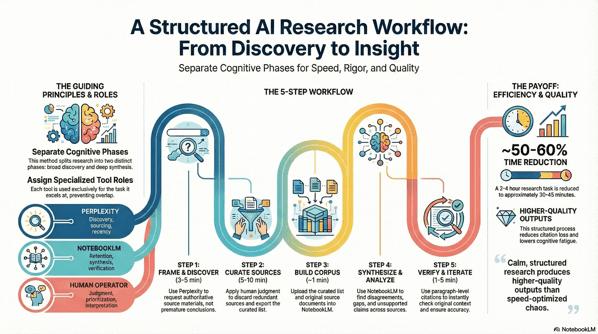
Research used to be simple: find books, read them, synthesize notes, write something coherent. But in the era of abundant information — and even more abundant tools — the core challenge isn’t a lack of sources; it’s context switching. Modern research paralysis often results from bouncing between gathering information and trying to make sense of it. That constant mental wrangling drains our capacity to think deeply.

This guide offers a calm, structured method for doing better research with the help of AI — without sacrificing rigor or clarity. You’ll learn how to use two specialized assistants — one for discovery and one for synthesis — to move from scattered facts to meaningful insights.

Unnamed 3


1. The Core Idea: Two Phases, Two Brains, One Workflow

The secret to better research isn’t more tools — it’s tool specialization. In this process, you separate your work into two clearly defined phases, each driven by a specific AI assistant:

Phase Goal Tool Role
Discovery Find the best materials Perplexity Live web researcher that retrieves authoritative sources
Synthesis Generate deep insights NotebookLM Context‑bound reasoning and structured analysis

The fundamental insight is that searching for information and understanding information are two distinct cognitive tasks. Conflating them creates mental noise that slows us down.


2. Why This Matters (and the AI Context)

Before we dive into the workflow, it’s worth grounding this methodology in what we currently know about AI’s real impact on knowledge work.

Recent economic research finds that access to generative AI can materially increase productivity for knowledge workers. For example:

  • Workers using AI tools reported saving an average of 5.4% of their work hours — roughly 2.2 hours per week — by reducing time spent on repetitive tasks, which corresponds to a roughly 1.1% increase in overall productivity

  • Field experiments have shown that when knowledge workers — such as customer support agents — have access to AI assistants, they resolve about 15% more issues per hour on average. 

  • Empirical studies also indicate that AI adoption is broad and growing: a majority of knowledge workers use generative AI tools in everyday work tasks like summarization, brainstorming, or information consolidation. 

Yet, productivity is not automatic. These tools augment human capability — they don’t replace judgment. The structured process below helps you keep control over quality while leveraging AI’s strengths.


3. The Workflow in Action

Let’s walk through the five steps of a real project. Our example research question:
What is the impact of AI on knowledge worker productivity?


Step 1: Framing the Quest with Perplexity (Discovery)

Objective: Collect high‑quality materials — not conclusions.

This is pure discovery. Carefully construct your prompt in Perplexity to gather:

  • Recent reports and academic research

  • Meta‑analyses and surveys

  • Long‑form PDFs and authoritative sources

Use constraints like filetype:pdf or site:.edu to surface formal research rather than repackaged content.

Why it works: Perplexity excels at scanning the live web and ranking sources by authority. It shouldn’t be asked to synthesize — that comes later.


Step 2: Curating Your Treasure (Human Judgment)

Objective: Vet and refine.

This is where your expertise matters most. Review each source for:

  • Recency: Is it up‑to‑date? AI and productivity research moves fast.

  • Credibility: Is it from a reputable institution or peer‑reviewed?

  • Relevance: Does it directly address your question?

  • Novelty: Does it offer unique insight or data?

Outcome: A curated set of URLs and a Perplexity results export (PDF) that documents your initial research map.


Step 3: Building Your Private Library in NotebookLM

Objective: Upload both context and evidence into a dedicated workspace.

What to upload:

  1. Your Perplexity export (for orientation)

  2. The original source documents (full depth)

Pro tip: Avoid uploading summaries only or raw sources without context. The first leads to shallow reasoning; the second leads to incoherent synthesis.

NotebookLM becomes your private, bounded reasoning space.


Step 4: Finding Hidden Connections (Synthesis)

Objective: Treat the AI as a reasoning partner — not an autopilot.

Ask NotebookLM questions like:

  • Where do these sources disagree on productivity impact?

  • What assumptions are baked into definitions of “productivity”?

  • Which sources offer the strongest evidence — and why?

  • What’s missing from these materials?

This step is where your analysis turns into insight.


Step 5: Trust, but Verify (Verification & Iteration)

Objective: Ensure accuracy and preserve nuance.

As NotebookLM provides answers with inline citations, click through to the original sources and confirm context integrity. Correct over‑generalizations or distortions before finalizing your conclusions.

This human‑in‑the‑loop verification is what separates authentic research from hallucinated summaries.


4. The Payoff: What You’ve Gained

A disciplined, AI‑assisted workflow isn’t about speed alone — though it does save time. It’s about quality, confidence, and clarity.

Here’s what this workflow delivers:

Improvement Area Expected Outcome
Time Efficiency Research cycles reduced by ~50–60% — from hours to under an hour when done well
Citation Integrity Claims backed by vetted sources
Analytical Rigor Contradictions and gaps are surfaced explicitly
Cognitive Load Less context switching means less burnout and clearer thinking

By the end of the process, you aren’t just informed — you’re oriented.


5. A Final Word of Advice

This structured workflow is powerful — but it’s not a replacement for thinking. Treat it as a discipline, not a shortcut.

  • Keep some time aside for creative wandering. Not all insights come from structured paths.

  • Understand your tools’ limits. AI is excellent at retrieval and pattern recognition — not at replacing judgment.

  • You’re still the one who decides what matters.


Conclusion: Calm, Structured Research Wins

By separating discovery from synthesis and assigning each task to the best available tool, you create a workflow that’s both efficient and rigorous. You emerge with insights grounded in evidence — and a process you can repeat.

In an age of information complexity, calm structure isn’t just a workflow choice — it’s a competitive advantage.

Apply this method to your next research project and experience the clarity for yourself.

Support My Work

Support the creation of high-impact content and research. Sponsorship opportunities are available for specific topics, whitepapers, tools, or advisory insights. Learn more or contribute here: Buy Me A Coffee


* AI tools were used as a research assistant for this content, but human moderation and writing are also included. The included images are AI-generated.