Introducing The Workday Effectiveness Index

Introduction:

I recently wrote about building systems for your worst days here

J0309621

That got me thinking that I need a system to measure how my systems and optimizations are performing on my worst (and average days for that matter) days. Thus: 

WDEI: Workday Effectiveness Index

What it is:

A quick metric for packed days so you know if your systems are carrying you or if there’s a bottleneck to fix.

Formula:

WDEI = (top‑leverage tasks completed ÷ top‑leverage tasks planned) × (focused minutes ÷ available “maker” minutes)

How to use (2‑minute setup):

Define top‑leverage tasks (3 max for the day).

Estimate maker minutes (non‑meeting, potentially focusable time).

Log focused minutes (actual deep‑work blocks ≥15 min, no context switches).

Compute WDEI at day end.

Interpretation:

≥ 0.60 → Systems working; keep current routines.

0.40–0.59 → Friction; tune meeting hygiene, buffers, or task slicing.

< 0.40 → Bottleneck; fix in the next weekly review (reprioritize, delegate, or automate).

Example (fast math):

Planned top‑leverage tasks: 3; completed: 2 → 2/3 = 0.67

Maker minutes: 90; focused minutes: 55 → 55/90 = 0.61

WDEI = 0.67 × 0.61 = 0.41 → bottleneck detected

Common fixes (pick one):

Reduce same‑day commitment: drop to 1–2 top‑leverage tasks on heavy days.

Pre‑build micro‑blocks: 3×20 min protected focus slots.

Convert meetings → async briefs; bundle decisions.

Pre‑stage work: checklist, files open, first keystroke defined.

Tiny tracker (copy/paste):

Date: __

TL planned: __ | TL done: __ | TL ratio: __

Maker min: __ | Focused min: __ | Focus ratio: __

WDEI = __ × __ = __

One friction to remove tomorrow: __

Support My Work:

Support the creation of high-impact content and research. Sponsorship opportunities are available for specific topics, whitepapers, tools, or advisory insights. Learn more or contribute here: Buy Me A Coffee


* AI tools were used as a research assistant for this content, but human moderation and writing are also included. The included images are AI-generated.
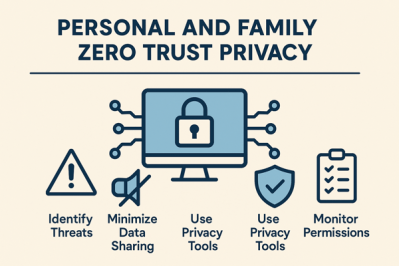
Zero-Trust Privacy Methodology for Individuals & Families

I set out to create a Zero Trust methodology for personal and family use. I have been interested in Zero Trust in information security foe years, and wondered what it might look like if I applied it to privacy on a personal level. Here is what I came up with:

PersonalZeroTrustPrivacy

Key takeaway: Secure your digital life by treating every account, device, network segment and data collection request as untrusted until proven otherwise. The roadmap below translates enterprise zero-trust ideas into a practical, repeatable program you can run at home.

1. Baseline Assessment (Week 1)

Task Why it matters How to do it
Inventory accounts, devices & data You can’t protect what you don’t know List every online account, smart-home device, computer, phone and the sensitive data each holds (e.g., health, finance, photos)12
Map trust relationships Reveals hidden attack paths Note which devices talk to one another and which accounts share log-ins or recovery e-mails34
Define risk tolerance Sets priorities Rank what would hurt most if stolen or leaked (identity, kids’ photos, medical files, etc.)5
 

2. Harden Identity & Access (Weeks 2-3)

Zero-Trust Principle Home Implementation Recommended Tools
Verify explicitly – Use a password manager to generate unique 16-character passwords – Turn on 2FA everywhere—prefer security keys for critical accounts67 1Password, Bitwarden + two FIDO2 keys
Least-privilege Share one family admin e-mail for critical services; give kids “child” or “guest” roles on devices rather than full admin rights8 Family Microsoft/Apple parental controls
Assume breach Create two recovery channels (second e-mail, phone) kept offline; store them in a fire-resistant safe6 Encrypted USB, paper copy
 

3. Secure Devices & Home Network (Weeks 3-4)

Layer Zero-Trust Control Concrete Steps
Endpoints Continuous posture checks Enable full-disk encryption, automatic patching and screen-lock timeouts on every phone, laptop and tablet56
IoT & guests Micro-segmentation Put smart-home gear on a separate SSID/VLAN; create a third “visitor” network with Internet-only access34
Router Strong identity & monitoring Change default admin password, enable WPA3, schedule automatic firmware updates and log remote-access attempts3
 

4. Protect Data Itself (Week 5)

  1. Encrypt sensitive documents locally (VeraCrypt, macOS FileVault).

  2. Use end-to-end–encrypted cloud storage (Proton Drive, Tresorit) not generic sync tools.

  3. Enable on-device backups and keep an offline copy (USB or NAS) rotated monthly16.

  4. Tokenize payment data with virtual cards and lock credit files to stop identity fraud6.

5. Data Hygiene & Minimization (Ongoing)

Habit Zero-Trust Rationale Frequency
Delete unused accounts & apps Reduce attack surface9 Quarterly
Scrub excess data (old emails, trackers, location history) Limit collateral damage if breached52 Monthly
Review social-media privacy settings Remove implicit trust in platforms9 After each major app update
Sanitize devices before resale Remove residual trust relationships When decommissioning hardware
 

6. Continuous Verification & Response (Ongoing)

  1. Automated Alerts – Turn on login-alert e-mails/SMS for major accounts and bank transactions7.

  2. Log Review Ritual – The first Sunday each month, scan password-manager breach reports, router logs and mobile “security & privacy” dashboards62.

  3. Incident Playbook – Pre-write steps for lost phone, compromised account or identity-theft notice: remote-wipe, password reset, credit freeze, police/FCC report5.

  4. Family Drills – Teach children to spot phishing, approve app permissions and ask before connecting a new device to Wi-Fi810.

7. Maturity Ladder

Level Description Typical Signals
Initial Strong passwords + MFA Few data-breach notices, but ad-tracking still visible
Advanced Network segmentation, encrypted cloud, IoT isolation No personalized ads, router logs clean
Optimal Hardware security keys, regular audits, locked credit, scripted backups Rare breach alerts, quick recovery rehearsed
 

Progress one level at a time; zero trust is a journey, not a switch.

Quick-Start 30-Day Checklist

Day Action
1-2 Complete inventory spreadsheet
3-5 Install password manager, reset top-20 account passwords
6-7 Buy two FIDO2 keys, enroll in critical accounts
8-10 Enable full-disk encryption on every device
11-15 Segment Wi-Fi (main, IoT, guest); update router firmware
16-18 Encrypt and back up sensitive documents
19-22 Delete five unused online accounts; purge old app data
23-26 Freeze credit files; set up credit alerts
27-28 Draft incident playbook; print and store offline
29-30 Family training session + schedule monthly log-review reminder
 

Why This Works

  • No implicit trust anywhere—every login, device and data request is re-authenticated or cryptographically protected34.

  • Attack surface shrinks—unique credentials, network segmentation and data minimization deny adversaries lateral movement511.

  • Rapid recovery—auditable logs, offline backups and a pre-built playbook shorten incident response time76.

Adopting these habits turns zero trust from a corporate buzzword into a sustainable family lifestyle that guards privacy, finances and peace of mind.


Support My Work

Support the creation of high-impact content and research. Sponsorship opportunities are available for specific topics, whitepapers, tools, or advisory insights. Learn more or contribute here: Buy Me A Coffee


References:

  1. https://bysafeonline.com/how-to-get-good-data-hygiene/
  2. https://github.com/Lissy93/personal-security-checklist
  3. https://www.mindpointgroup.com/blog/applying-the-principles-of-zero-trust-architecture-to-your-home-network
  4. https://www.forbes.com/sites/alexvakulov/2025/03/06/secure-your-home-network-with-zero-trust-security-best-practices/
  5. https://www.enisa.europa.eu/topics/cyber-hygiene
  6. https://guptadeepak.com/essential-security-privacy-checklist-2025-personal/
  7. https://www.fultonbank.com/Education-Center/Privacy-and-Security/Online-Privacy-Checklist
  8. https://www.reddit.com/r/privacy/comments/1jnhvmg/what_are_all_the_privacy_mustdos_that_one_should/
  9. https://privacybee.com/blog/digital-hygiene-warning-signs/
  10. https://www.infosecurityeurope.com/en-gb/blog/guides-checklists/10-everyday-practices-to-enhance-digital-security.html
  11. https://aws.amazon.com/security/zero-trust/
  12. https://www.okta.com/identity-101/zero-trust-framework-a-comprehensive-modern-security-model/
  13. https://www.reddit.com/r/PrivacyGuides/comments/1441euo/what_are_say_the_top_510_most_important/
  14. https://www.microsoft.com/en-us/security/business/zero-trust
  15. https://www.ssh.com/academy/iam/zero-trust-framework
  16. https://www.gpo.gov/docs/default-source/accessibility-privacy-coop-files/basic-privacy-101-for-public-website-04112025.pdf
  17. https://nordlayer.com/learn/zero-trust/what-is-zero-trust/
  18. https://www.priv.gc.ca/en/privacy-topics/information-and-advice-for-individuals/your-privacy-rights/02_05_d_64_tips/
  19. https://www.mindpointgroup.com/blog/securing-your-home-office-from-iot-devices-with-zta
  20. https://www.crowdstrike.com/en-us/cybersecurity-101/zero-trust-security/
  21. https://www.digitalguardian.com/blog/data-privacy-best-practices-ensure-compliance-security
  22. https://www.fortinet.com/resources/cyberglossary/how-to-implement-zero-trust
  23. https://www.cisa.gov/zero-trust-maturity-model
  24. https://www.cisco.com/site/us/en/learn/topics/networking/what-is-zero-trust-networking.html
  25. https://www.fortra.com/solutions/zero-trust
  26. https://lumenalta.com/insights/11-best-practices-for-data-privacy-and-compliance
  27. https://www.cloudflare.com/learning/security/glossary/what-is-zero-trust/
  28. https://www.fortinet.com/resources/cyberglossary/what-is-the-zero-trust-network-security-model
  29. https://www.keepersecurity.com/solutions/zero-trust-security.html
  30. https://it.cornell.edu/security-and-policy/data-hygiene-best-practices
  31. https://termly.io/resources/checklists/privacy-policy-requirements/
  32. https://www.hipaajournal.com/hipaa-compliance-checklist/
  33. https://guardiandigital.com/resources/blog/cyber-hygiene-data-protection
  34. https://dodcio.defense.gov/Portals/0/Documents/Library/ZeroTrustOverlays.pdf
  35. https://www.mightybytes.com/blog/data-privacy-checklist-free-download/
  36. https://www.reddit.com/r/AskNetsec/comments/10h1b3q/what_is_zerotrust_outside_of_the_marketing_bs/
  37. https://www.techtarget.com/searchsecurity/definition/cyber-hygiene

Tool Deep Dive: Mental Models Tracker + AI Insights

The productivity and rational-thinking crowd has long loved mental models. We memorize them. We quote them. We sprinkle them into conversations like intellectual seasoning. But here’s the inconvenient truth: very few of us actually track how we use them. Even fewer build systems to reinforce their practical application in daily life. That gap is where this tool deep dive lands.

MentalModels

The Problem: Theory Without a Feedback Loop

You know First Principles Thinking, Inversion, Opportunity Cost, Hanlon’s Razor, the 80/20 Rule, and the rest. But do you know if you’re actually applying them consistently? Or are they just bouncing around in your head, waiting to be summoned by a Twitter thread?

In an increasingly AI-enabled work landscape, knowing mental models isn’t enough. Systems thinking alone won’t save you. Implementation will.

Why Now: The Implementation Era

AI isn’t just a new toolset. It’s a context shifter. We’re all being asked to think faster, act more strategically, and manage complexity in real-time. It’s not just about understanding systems, but executing decisions with clarity and intention. That means our cognitive infrastructure needs reinforcing.

The Tracker: One Week to Conscious Application

I ran a simple demo: one week, one daily journal template, tracking how mental models showed up (or could have) in real-world decisions.

  • A decision or scenario I encountered
  • Which models I applied (or neglected)
  • The outcome (or projected cost of neglect)
  • Reflections on integration with MATTO

You can download the journal template here.

AI Prompt: Your On-Demand Decision Partner

Here’s the ChatGPT prompt I used daily:

“I’m going to describe a situation I encountered today. I want you to help me analyze it using the following mental models: First Principles, Inversion, Opportunity Cost, Diminishing Returns, Hanlon’s Razor, Parkinson’s Law, Loss Aversion, Switching Costs, Circle of Competence, Regret Minimization, Pareto Principle, and Game Theory. First, tell me which models are most relevant. Then, walk me through how to apply them. Then, ask me reflective questions for journaling.”

Integration with MATTO: Tracking the True Cost

In my journaling system, I use MATTO (Money, Attention, Time, Trust, Opportunity) to score decisions. After a model analysis, I tag entries with their relevant MATTO implications:

  • Did I spend unnecessary attention by failing to invert?
  • Did loss aversion skew my sense of opportunity?
  • Was trust eroded due to ignoring second-order consequences?

Final Thought: Self-Awareness at Scale

We don’t need more models. We need mechanisms.

This is a small experiment in building them. Give it a week. Let your decisions become a training dataset. The clarity you’ll gain might just be the edge you’re looking for.

Support My Work

Support the creation of high-impact content and research. Sponsorship opportunities are available for specific topics, whitepapers, tools, or advisory insights. Learn more or contribute here: Buy Me A Coffee


* AI tools were used as a research assistant for this content, but human moderation and writing are also included. The included images are AI-generated.