I set out to create a Zero Trust methodology for personal and family use. I have been interested in Zero Trust in information security foe years, and wondered what it might look like if I applied it to privacy on a personal level. Here is what I came up with:
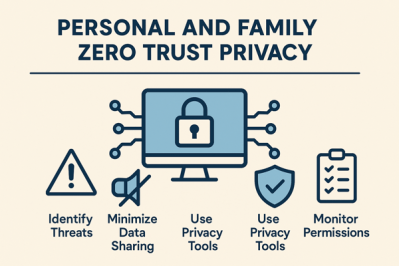
Key takeaway: Secure your digital life by treating every account, device, network segment and data collection request as untrusted until proven otherwise. The roadmap below translates enterprise zero-trust ideas into a practical, repeatable program you can run at home.
1. Baseline Assessment (Week 1)
| Task | Why it matters | How to do it |
|---|---|---|
| Inventory accounts, devices & data | You can’t protect what you don’t know | List every online account, smart-home device, computer, phone and the sensitive data each holds (e.g., health, finance, photos)12 |
| Map trust relationships | Reveals hidden attack paths | Note which devices talk to one another and which accounts share log-ins or recovery e-mails34 |
| Define risk tolerance | Sets priorities | Rank what would hurt most if stolen or leaked (identity, kids’ photos, medical files, etc.)5 |
2. Harden Identity & Access (Weeks 2-3)
| Zero-Trust Principle | Home Implementation | Recommended Tools |
|---|---|---|
| Verify explicitly | – Use a password manager to generate unique 16-character passwords – Turn on 2FA everywhere—prefer security keys for critical accounts67 | 1Password, Bitwarden + two FIDO2 keys |
| Least-privilege | Share one family admin e-mail for critical services; give kids “child” or “guest” roles on devices rather than full admin rights8 | Family Microsoft/Apple parental controls |
| Assume breach | Create two recovery channels (second e-mail, phone) kept offline; store them in a fire-resistant safe6 | Encrypted USB, paper copy |
3. Secure Devices & Home Network (Weeks 3-4)
| Layer | Zero-Trust Control | Concrete Steps |
|---|---|---|
| Endpoints | Continuous posture checks | Enable full-disk encryption, automatic patching and screen-lock timeouts on every phone, laptop and tablet56 |
| IoT & guests | Micro-segmentation | Put smart-home gear on a separate SSID/VLAN; create a third “visitor” network with Internet-only access34 |
| Router | Strong identity & monitoring | Change default admin password, enable WPA3, schedule automatic firmware updates and log remote-access attempts3 |
4. Protect Data Itself (Week 5)
-
Encrypt sensitive documents locally (VeraCrypt, macOS FileVault).
-
Use end-to-end–encrypted cloud storage (Proton Drive, Tresorit) not generic sync tools.
-
Enable on-device backups and keep an offline copy (USB or NAS) rotated monthly16.
-
Tokenize payment data with virtual cards and lock credit files to stop identity fraud6.
5. Data Hygiene & Minimization (Ongoing)
| Habit | Zero-Trust Rationale | Frequency |
|---|---|---|
| Delete unused accounts & apps | Reduce attack surface9 | Quarterly |
| Scrub excess data (old emails, trackers, location history) | Limit collateral damage if breached52 | Monthly |
| Review social-media privacy settings | Remove implicit trust in platforms9 | After each major app update |
| Sanitize devices before resale | Remove residual trust relationships | When decommissioning hardware |
6. Continuous Verification & Response (Ongoing)
-
Automated Alerts – Turn on login-alert e-mails/SMS for major accounts and bank transactions7.
-
Log Review Ritual – The first Sunday each month, scan password-manager breach reports, router logs and mobile “security & privacy” dashboards62.
-
Incident Playbook – Pre-write steps for lost phone, compromised account or identity-theft notice: remote-wipe, password reset, credit freeze, police/FCC report5.
-
Family Drills – Teach children to spot phishing, approve app permissions and ask before connecting a new device to Wi-Fi810.
7. Maturity Ladder
| Level | Description | Typical Signals |
|---|---|---|
| Initial | Strong passwords + MFA | Few data-breach notices, but ad-tracking still visible |
| Advanced | Network segmentation, encrypted cloud, IoT isolation | No personalized ads, router logs clean |
| Optimal | Hardware security keys, regular audits, locked credit, scripted backups | Rare breach alerts, quick recovery rehearsed |
Progress one level at a time; zero trust is a journey, not a switch.
Quick-Start 30-Day Checklist
| Day | Action |
|---|---|
| 1-2 | Complete inventory spreadsheet |
| 3-5 | Install password manager, reset top-20 account passwords |
| 6-7 | Buy two FIDO2 keys, enroll in critical accounts |
| 8-10 | Enable full-disk encryption on every device |
| 11-15 | Segment Wi-Fi (main, IoT, guest); update router firmware |
| 16-18 | Encrypt and back up sensitive documents |
| 19-22 | Delete five unused online accounts; purge old app data |
| 23-26 | Freeze credit files; set up credit alerts |
| 27-28 | Draft incident playbook; print and store offline |
| 29-30 | Family training session + schedule monthly log-review reminder |
Why This Works
-
No implicit trust anywhere—every login, device and data request is re-authenticated or cryptographically protected34.
-
Attack surface shrinks—unique credentials, network segmentation and data minimization deny adversaries lateral movement511.
-
Rapid recovery—auditable logs, offline backups and a pre-built playbook shorten incident response time76.
Adopting these habits turns zero trust from a corporate buzzword into a sustainable family lifestyle that guards privacy, finances and peace of mind.
Support My Work
Support the creation of high-impact content and research. Sponsorship opportunities are available for specific topics, whitepapers, tools, or advisory insights. Learn more or contribute here: Buy Me A Coffee
References:
- https://bysafeonline.com/how-to-get-good-data-hygiene/
- https://github.com/Lissy93/personal-security-checklist
- https://www.mindpointgroup.com/blog/applying-the-principles-of-zero-trust-architecture-to-your-home-network
- https://www.forbes.com/sites/alexvakulov/2025/03/06/secure-your-home-network-with-zero-trust-security-best-practices/
- https://www.enisa.europa.eu/topics/cyber-hygiene
- https://guptadeepak.com/essential-security-privacy-checklist-2025-personal/
- https://www.fultonbank.com/Education-Center/Privacy-and-Security/Online-Privacy-Checklist
- https://www.reddit.com/r/privacy/comments/1jnhvmg/what_are_all_the_privacy_mustdos_that_one_should/
- https://privacybee.com/blog/digital-hygiene-warning-signs/
- https://www.infosecurityeurope.com/en-gb/blog/guides-checklists/10-everyday-practices-to-enhance-digital-security.html
- https://aws.amazon.com/security/zero-trust/
- https://www.okta.com/identity-101/zero-trust-framework-a-comprehensive-modern-security-model/
- https://www.reddit.com/r/PrivacyGuides/comments/1441euo/what_are_say_the_top_510_most_important/
- https://www.microsoft.com/en-us/security/business/zero-trust
- https://www.ssh.com/academy/iam/zero-trust-framework
- https://www.gpo.gov/docs/default-source/accessibility-privacy-coop-files/basic-privacy-101-for-public-website-04112025.pdf
- https://nordlayer.com/learn/zero-trust/what-is-zero-trust/
- https://www.priv.gc.ca/en/privacy-topics/information-and-advice-for-individuals/your-privacy-rights/02_05_d_64_tips/
- https://www.mindpointgroup.com/blog/securing-your-home-office-from-iot-devices-with-zta
- https://www.crowdstrike.com/en-us/cybersecurity-101/zero-trust-security/
- https://www.digitalguardian.com/blog/data-privacy-best-practices-ensure-compliance-security
- https://www.fortinet.com/resources/cyberglossary/how-to-implement-zero-trust
- https://www.cisa.gov/zero-trust-maturity-model
- https://www.cisco.com/site/us/en/learn/topics/networking/what-is-zero-trust-networking.html
- https://www.fortra.com/solutions/zero-trust
- https://lumenalta.com/insights/11-best-practices-for-data-privacy-and-compliance
- https://www.cloudflare.com/learning/security/glossary/what-is-zero-trust/
- https://www.fortinet.com/resources/cyberglossary/what-is-the-zero-trust-network-security-model
- https://www.keepersecurity.com/solutions/zero-trust-security.html
- https://it.cornell.edu/security-and-policy/data-hygiene-best-practices
- https://termly.io/resources/checklists/privacy-policy-requirements/
- https://www.hipaajournal.com/hipaa-compliance-checklist/
- https://guardiandigital.com/resources/blog/cyber-hygiene-data-protection
- https://dodcio.defense.gov/Portals/0/Documents/Library/ZeroTrustOverlays.pdf
- https://www.mightybytes.com/blog/data-privacy-checklist-free-download/
- https://www.reddit.com/r/AskNetsec/comments/10h1b3q/what_is_zerotrust_outside_of_the_marketing_bs/
- https://www.techtarget.com/searchsecurity/definition/cyber-hygiene
 Not Quite Random